Digital Operations for your business. Your systems stay.
Arqent Industry puts AI operators to work in the systems you already run – ERP, CRM, mail, files and documents. They take over recurring work, show the source of every result and ask your team before anything critical happens.
The problem
Why recurring work eats the week
Information scatters, knowledge walks out the door, and AI tools move company data into clouds nobody approved.
SCATTERED
Information in ten tools
Orders, status, files, decisions and responsibilities live everywhere. Whoever needs the full picture collects it by hand – every week again.
VOLATILE
Knowledge leaves with people
What really carries a process is not in any system: experience, context, reasoning. When someone leaves, it leaves with them.
UNGOVERNED
AI tools without control
Teams already use AI – unofficially, with company data, outside any boundary. Banning it fails. Governing it works.
See it run
Watch an operator book an order
From the order inbox to the ERP: extraction, matching, an independent check and your approval before anything is booked.
Steps
Operator
Order desk operator
Goal
The operator starts as soon as the goal is set.
Simulated run with illustrative data.
Product view
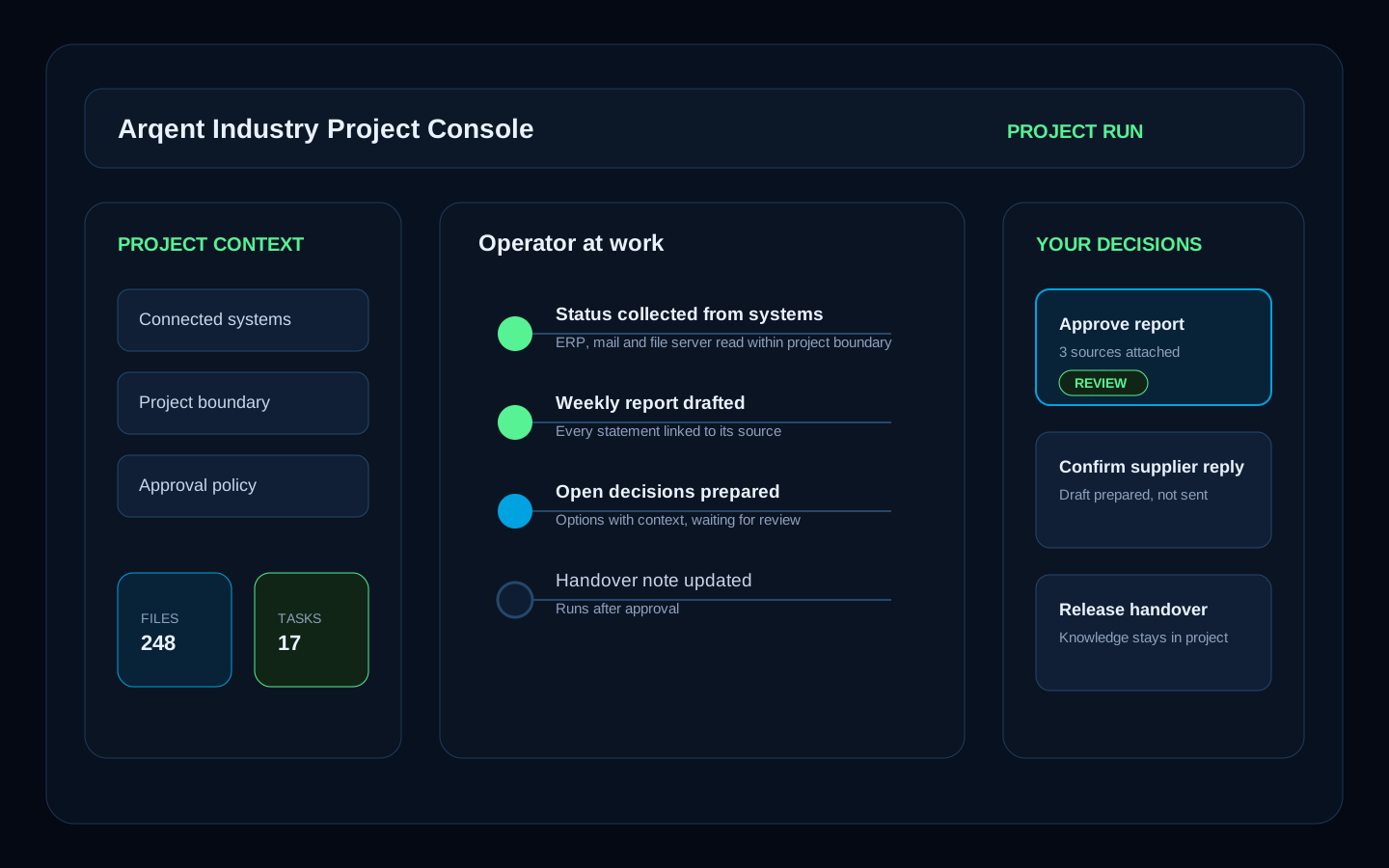
What an operator actually does
Not a chatbot. An operator has a role, a goal and clear limits: it reads what it is allowed to read, does the work and asks when it matters.
Works
Order intake, reports, research, documentation
Asks
Approval before writing to your systems
Shows
The source behind every number
EVIDENCE TRAIL
Every result stays linked to its sources
Use cases
Where Digital Operations take over
No transformation program required. Start where your team loses the most time today.
Order management
From inbox to booked order
Orders arrive as emails and PDF attachments. The operator extracts the line items, matches customer and articles, checks the order and prepares the ERP entry. A person approves before anything is booked – and the operator keeps working through the inbox on its own schedule.
Discuss this use caseSystems and sources
What the operator does
Results
Sales and inside sales
Answers from your ERP in plain language
Stock, storage location, delivery status, sales history: the operator answers directly from the ERP – including whether a customer visit is worth it. Every number links back to the record it came from.
Discuss this use caseSystems and sources
What the operator does
Results
Field sales
Sales intelligence on your own CRM
Every rep has different customers, questions and targets. A personal operator works on your CRM and ERP data: revenue potential per customer, early churn warnings and a full briefing before every visit.
Discuss this use caseSystems and sources
What the operator does
Results
Project management
The weekly status writes itself
Every Friday someone collects status from mail, tickets and files by hand. The operator drafts the report from the connected systems – as Word or PowerPoint in your corporate design, with every number linked to its source.
Discuss this use caseSystems and sources
What the operator does
Results
Product management
Product answers in seconds – with sources
Datasheets are scattered across PIM, document systems and file shares. The operator merges your sources and answers while the customer is still on the phone – alternatives included, source always attached.
Discuss this use caseSystems and sources
What the operator does
Results
E-commerce
Product data for every sales channel
From the article record to the listing: the operator collects verified technical attributes, prepares images and writes texts for your shop and marketplaces. Nothing goes live before approval, and the status per channel stays visible.
Discuss this use caseSystems and sources
What the operator does
Results
Finance and accounting
Accounting without copy and paste
Receipts, invoices, contacts and payments: the operator reads and prepares them in your accounting system. Reading is free, every write action waits for approval.
Discuss this use caseSystems and sources
What the operator does
Results
IT service
Service desk under control
Backlog, ticket age and reopen rate straight from your ticket system. The operator watches the numbers, flags what is slipping and prepares the weekly review.
Discuss this use caseSystems and sources
What the operator does
Results
Marketing
A marketing team of operators
A lead operator watches trends and hands work to its team: one creates tickets, one drafts posts, one keeps the editorial plan. Nothing is published without approval.
Discuss this use caseSystems and sources
What the operator does
Results
Compliance
Sanctions and export screening
Customers, suppliers and business partners are screened against sanctions lists before an order goes out – with the match, the list entry and the decision documented.
Discuss this use caseSystems and sources
What the operator does
Results
Knowledge management
Knowledge that stays in the company
What projects, customers and processes teach your team becomes organizational memory – with its source, reviewable and revocable. When someone leaves, the knowledge stays.
Discuss this use caseSystems and sources
What the operator does
Results
Operations and IT
Your own process app – described, not programmed
Describe the process. Solution Studio turns it into an app step by step – requirements, design, code, review. The code stays visible, and nothing is deployed without your approval.
Discuss this use caseSystems and sources
What the operator does
Results
IT and compliance
AI governance instead of shadow AI
Teams already use AI – often outside any boundary. Arqent gives them governed operators instead, with an AI inventory for the EU AI Act, a trust center and a complete audit trail.
Discuss this use caseSystems and sources
What the operator does
Results
What makes it different
More than an AI assistant
Assistants answer questions. Operators take responsibility for a result – under your rules.
WORK
Operators own goals
No process modeling, no workflow diagrams. Agree on the goal – the operator plans the steps and works through them, once or on a schedule.
Learn MoreCHECK
Nothing counts unchecked
A separate, blind review checks every result against the agreed criteria. What cannot be confirmed does not count.
Learn MoreAPPROVE
People decide what matters
Bookings, emails and changes in your systems wait for approval. Recurring actions can be approved once and revoked at any time.
Learn MoreTrust model
Works with the systems you already run
ERP, CRM, mail, files and your own tools – connected via connectors and MCP. No migration, no replacement project.
Office and collaboration
Mail, calendar, files and chat.
- Microsoft 365
- Google Workspace
- Slack
- Microsoft Teams
CRM and sales
Customers, deals and activities.
- Salesforce
- HubSpot
- Pipedrive
ERP and finance
Orders, stock, invoices and payments.
- abas ERP
- Lexware Office
- Stripe
Work management
Tickets, tasks and documentation.
- Jira and Confluence
- YouTrack
- Asana
- Linear
- Notion
Commerce and content
Shops, listings and websites.
- Shopify
- WooCommerce
- WordPress
Your own systems
Anything with an interface.
- MCP servers
- REST APIs
- IMAP and SMTP mail
Product view
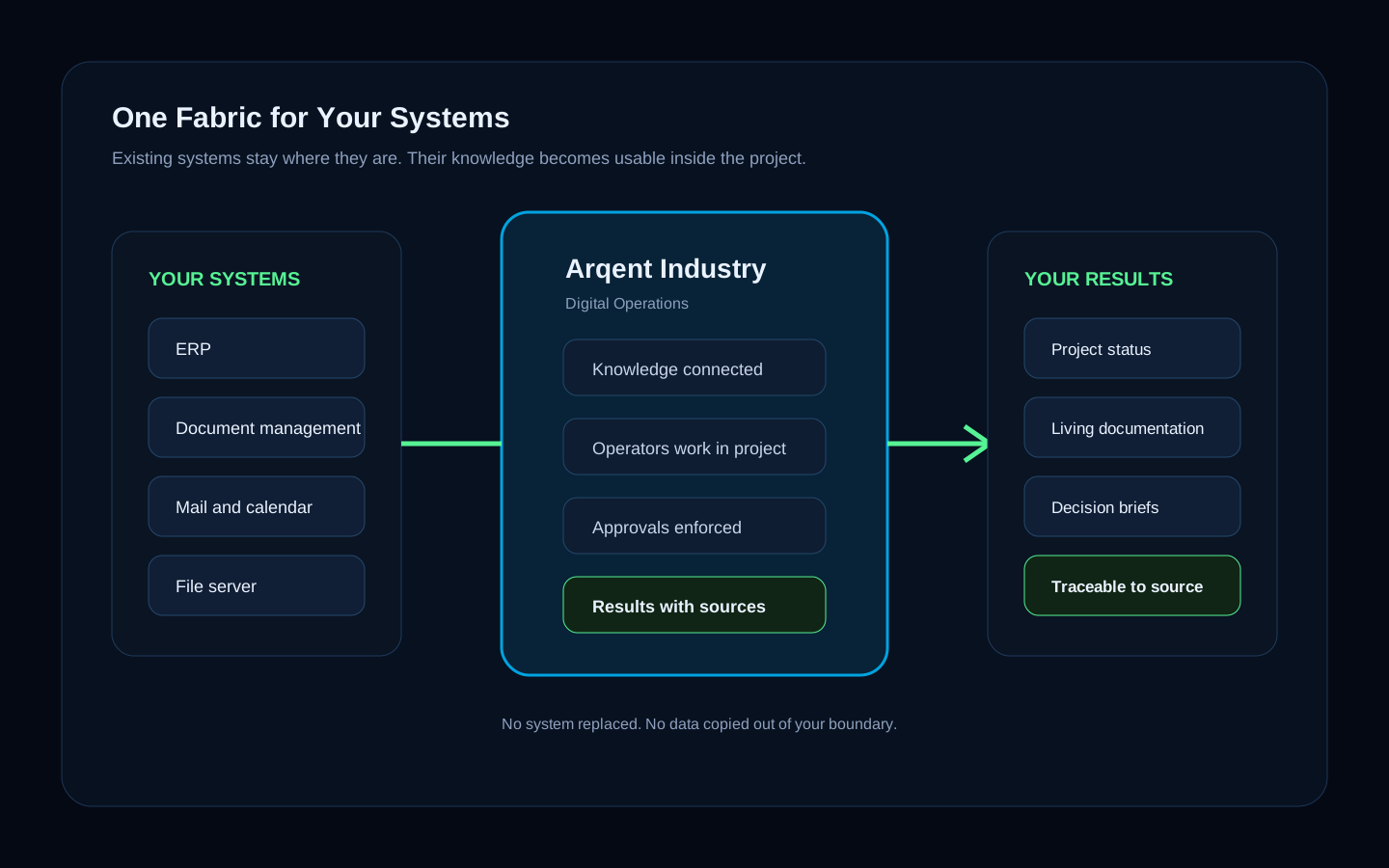
Your systems stay. Their knowledge starts working.
ERP, document management, mail, file server – Arqent Industry connects what you already run. Operators work with it, and what they learn stays as organizational memory with sources.
Connect
Existing systems, files and sources
Use
Operators work where the data already is
Keep
Knowledge stays in the company, with sources
PLATFORM
From your systems to verified results
People and operators
More capacity. Not fewer people.
Operators take over the routine that eats the week. Your people move up the value chain – and the knowledge they build stays in the company.
RELIEVE
Routine goes to operators
Order intake, status reports, documentation, searching, preparing – the work nobody was hired for runs in the background.
GROW
People move up
Your experts spend their time on judgment, customers and decisions – the work that actually needs them.
KEEP
Knowledge compounds
What operators and people learn becomes organizational memory – and makes the next process faster.
Product view
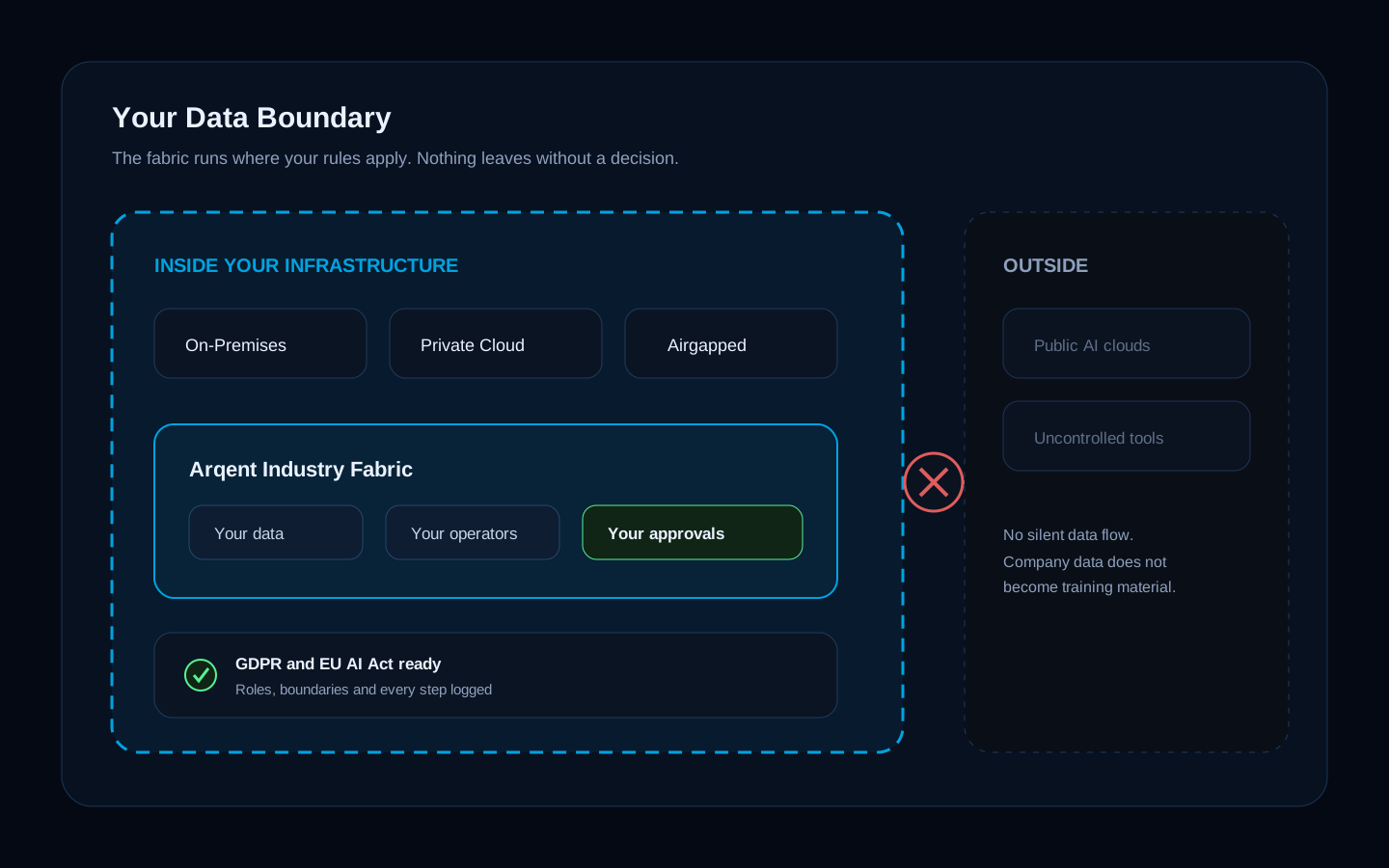
Sovereignty is not a feature. It is the default.
Run Arqent Industry as SaaS, on-premises or fully airgapped. Choose the model provider: local models in your own infrastructure or external providers of your choice. We do not train models on your data.
Deploy
SaaS, on-premises or airgapped
Models
Local or external – your choice
Comply
AI inventory for the EU AI Act, GDPR export
DEPLOYMENT
Same platform, your data boundary
Trust model
Control by design
The same platform government and security teams use – available for your business.
Deployment
Run the platform where your data boundary requires.
- SaaS
- On-premises
- Airgapped
Governance
Roles, project boundaries and approvals apply to people and operators alike.
- Project boundaries
- Human approval
- Execution logs
Evidence
Results stay tied to their sources and the decisions behind them.
- Source links
- Independent checks
- Audit trail
How to start
From first conversation to verified results in six weeks
No strategy workshops. One real process, one concrete problem, one decision based on results.
SCOPING
Week 1
We pick one real process and one concrete problem together – order intake, reporting or knowledge handover.
Learn MorePILOT
Weeks 2-6
Operators work in your environment on your data. Your team sees every step, every source, every approval.
REVIEW
Decision
You decide on verified results, not on a demo. The evidence trail of the pilot is the argument.
Industry Pilot Request
Fill out the form below and our team will get back to you.