Controlled AI. Real results.
What Digital Operations take over
Use cases for enterprises and for government and security teams. Every one runs with sources, independent checks and human approval.
Use cases
For enterprises
Operators work in your ERP, CRM, mail, files and documents – and ask before anything critical happens.
Order management
From inbox to booked order
Orders arrive as emails and PDF attachments. The operator extracts the line items, matches customer and articles, checks the order and prepares the ERP entry. A person approves before anything is booked – and the operator keeps working through the inbox on its own schedule.
Discuss this use caseSystems and sources
What the operator does
Results
Sales and inside sales
Answers from your ERP in plain language
Stock, storage location, delivery status, sales history: the operator answers directly from the ERP – including whether a customer visit is worth it. Every number links back to the record it came from.
Discuss this use caseSystems and sources
What the operator does
Results
Field sales
Sales intelligence on your own CRM
Every rep has different customers, questions and targets. A personal operator works on your CRM and ERP data: revenue potential per customer, early churn warnings and a full briefing before every visit.
Discuss this use caseSystems and sources
What the operator does
Results
Project management
The weekly status writes itself
Every Friday someone collects status from mail, tickets and files by hand. The operator drafts the report from the connected systems – as Word or PowerPoint in your corporate design, with every number linked to its source.
Discuss this use caseSystems and sources
What the operator does
Results
Product management
Product answers in seconds – with sources
Datasheets are scattered across PIM, document systems and file shares. The operator merges your sources and answers while the customer is still on the phone – alternatives included, source always attached.
Discuss this use caseSystems and sources
What the operator does
Results
E-commerce
Product data for every sales channel
From the article record to the listing: the operator collects verified technical attributes, prepares images and writes texts for your shop and marketplaces. Nothing goes live before approval, and the status per channel stays visible.
Discuss this use caseSystems and sources
What the operator does
Results
Finance and accounting
Accounting without copy and paste
Receipts, invoices, contacts and payments: the operator reads and prepares them in your accounting system. Reading is free, every write action waits for approval.
Discuss this use caseSystems and sources
What the operator does
Results
IT service
Service desk under control
Backlog, ticket age and reopen rate straight from your ticket system. The operator watches the numbers, flags what is slipping and prepares the weekly review.
Discuss this use caseSystems and sources
What the operator does
Results
Marketing
A marketing team of operators
A lead operator watches trends and hands work to its team: one creates tickets, one drafts posts, one keeps the editorial plan. Nothing is published without approval.
Discuss this use caseSystems and sources
What the operator does
Results
Compliance
Sanctions and export screening
Customers, suppliers and business partners are screened against sanctions lists before an order goes out – with the match, the list entry and the decision documented.
Discuss this use caseSystems and sources
What the operator does
Results
Knowledge management
Knowledge that stays in the company
What projects, customers and processes teach your team becomes organizational memory – with its source, reviewable and revocable. When someone leaves, the knowledge stays.
Discuss this use caseSystems and sources
What the operator does
Results
Operations and IT
Your own process app – described, not programmed
Describe the process. Solution Studio turns it into an app step by step – requirements, design, code, review. The code stays visible, and nothing is deployed without your approval.
Discuss this use caseSystems and sources
What the operator does
Results
IT and compliance
AI governance instead of shadow AI
Teams already use AI – often outside any boundary. Arqent gives them governed operators instead, with an AI inventory for the EU AI Act, a trust center and a complete audit trail.
Discuss this use caseSystems and sources
What the operator does
Results
Use cases
For government and security teams
Operators work inside the case – with sources, independent checks and the analyst in control.
Investigations
Case-native investigations
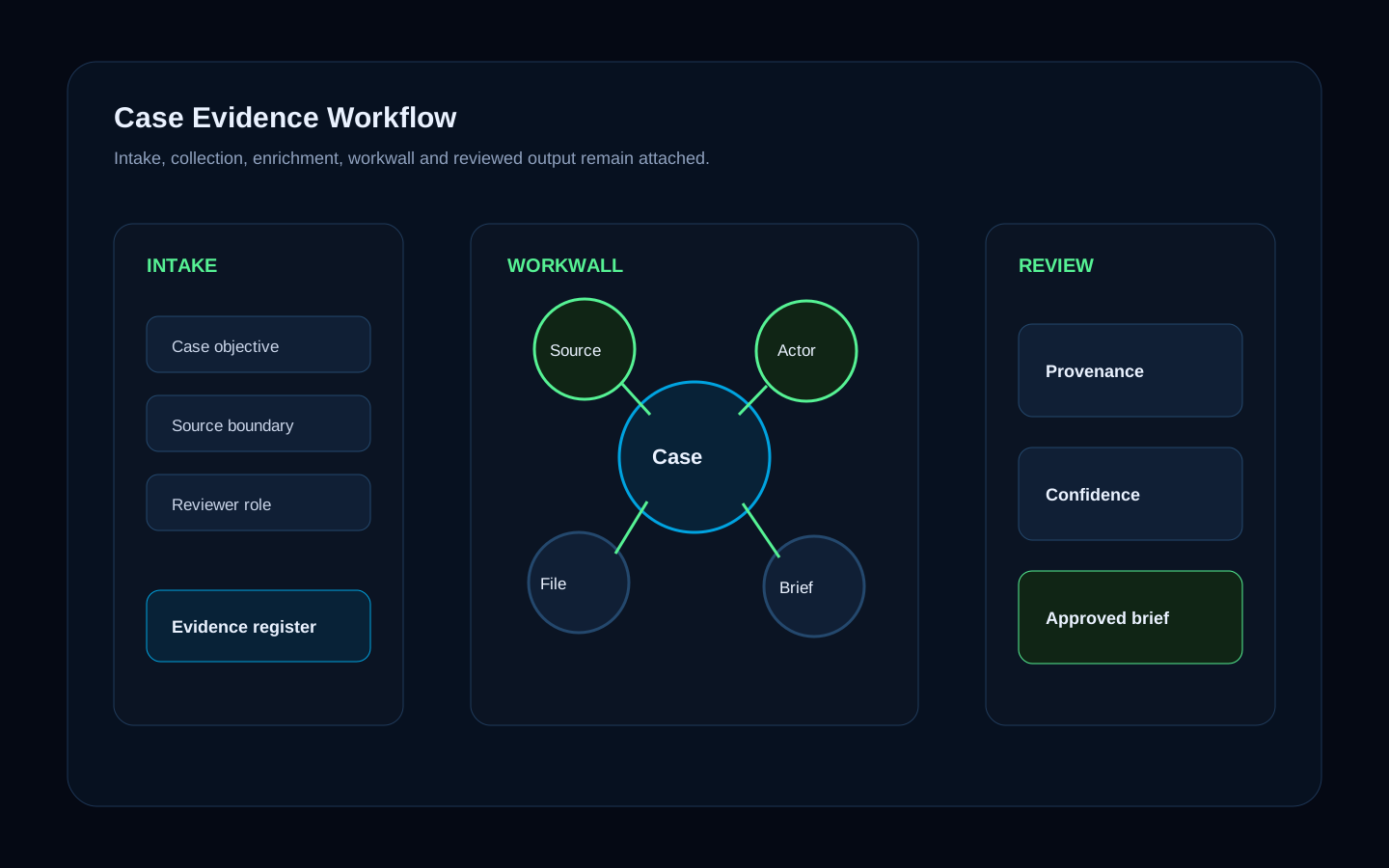
From the first lead to the final briefing, operators collect, enrich and correlate inside the case. Sources, findings, analyst decisions and reports stay in one record instead of chats, spreadsheets and point tools.
Explore workflowSystems and sources
What the operator does
Results
OSINT
OSINT analysis
Operators collect and assess open sources – usernames, email registrations, domains, social and messaging channels including Telegram, and commercial OSINT such as Fivecast ONYX. Every hit gets a source note and a false-positive check before it becomes a finding.
Explore workflowSystems and sources
What the operator does
Results
Threat intelligence
Darknet intelligence
Find and map onion services, marketplaces, vendors and indicators – with darknet search, an isolated Tor browser and analysis of the Tor relay network. Collection stays governed, and every artifact stays attached to the case.
Explore workflowSystems and sources
What the operator does
Results
Financial investigations
Crypto wallet intelligence
Wallets found on the darknet or in seized material are analysed, linked wallets are traced and connected to actors, accounts and domains in the case graph.
Explore workflowSystems and sources
What the operator does
Results
Financial crime and compliance
Sanctions screening
Persons, organisations, vessels and aircraft are screened against sanctions lists. Matches, list entries and the reviewer decision are documented in the case.
Discuss this use caseSystems and sources
What the operator does
Results
Fraud and DFIR
Email forensics and BEC
A suspicious email is analysed – headers, domains, links and attachments – enriched, correlated with the case and turned into a report a reviewer can stand behind.
Explore workflowSystems and sources
What the operator does
Results
OSINT
Account and identity investigations
Username and account signals across platforms are compared, false positives are marked, and the remaining hits are connected into an identity graph with source notes.
Explore workflowSystems and sources
What the operator does
Results
Digital forensics
Image and media forensics
Images are checked for metadata, hidden content and manipulation, text is extracted and translated, and a sanitized copy plus a signed evidence bundle go into the case.
Discuss this use caseSystems and sources
What the operator does
Results
Critical infrastructure
Situational awareness for critical sites
Global events, natural hazards and incidents appear on one live map next to your sites. Geofences with NATO symbology (APP-6) mark what matters, and operators report what changed and what it affects.
Explore workflowSystems and sources
What the operator does
Results
Protection of sites and events
Drone and radio detection
Connected sensors pick up drone Remote ID, aircraft ADS-B, Bluetooth and radio signals. Detections appear on a live map, flights can be tracked, and operators flag what needs attention.
Discuss this use caseSystems and sources
What the operator does
Results
Monitoring
Continuous monitoring
Operators watch targets, topics and sources on a schedule – day and night – and report only what changed, with the evidence attached. Repeated failures escalate to a person.
Discuss this use caseSystems and sources
What the operator does
Results
Classified environments
Airgapped intelligence
The full platform runs without any connection to the outside – with local models, local evidence storage and the same checks and approvals as everywhere else.
Explore workflowSystems and sources
What the operator does
Results
Platform teams
External tool orchestration
Your team already owns tools and data sources. Arqent wraps them as governed tools: a policy check before every call, a full execution history and results that land in the case.
Explore workflowSystems and sources
What the operator does
Results
Security compliance
Control documentation for security frameworks
Import NIST 800-53 and FedRAMP baselines, document each control with four-eyes review and export a validated system security plan for your own systems.
Discuss this use caseSystems and sources
What the operator does
Results
Product view
Every use case ends in a result you can check
Whether it is a booked order or a case briefing: the result carries its sources, the independent check and the approval behind it.
Input
Email, document, record, signal or request
Work
Operators in your systems, under policy
Result
Checked, approved and traceable
EVIDENCE TRAIL
Every result stays linked to its sources
Your process is not on the list?
Describe it. We show you how operators take it over – or how Solution Studio builds the app for it.